


Super Clean Pro
4.485.00 Reviews
App Specs
- Version
- 1.1.0
- Updated On
- License
- Free
- Downloads
- 500,000+
- Developer
- FAWZ STUDIO
- Categories
- Productivity
- Platform
- Android
Screenshots
 Analysis by AppCompare
I find phone-cleaning apps most useful when they make a specific chore easier, not when they promise to transform an aging device into a new one. Super Clean Pro is an Android productivity app from FAWZ STUDIO, and its central appeal is a simple one: it puts cleanup tools behind a straightforward interface. That can suit someone who wants a quick way to review storage or try basic maintenance without learning a complicated utility. I’d approach any cleaner with realistic expectations, though. Clearing space can help when storage is tight, but it does not automatically fix every cause of slow performance, heat, or battery drain.
What free access means in practice
The app is free, so there is no purchase price to weigh before trying it. That makes the decision relatively low-commitment: you can see whether its approach fits your routine without first paying for a subscription or a one-time upgrade. Free access is not the same thing as a guarantee that every feature or future version will remain unchanged, so I would judge it by what is available when you use it rather than assume a particular pricing model beyond its current free status.
Its public reception offers some context, but not a substitute for deciding whether it suits your phone. It has an average rating of 4.5 from around 2,600 ratings, with over 500,000 installs. I read those figures as signs that plenty of Android users have tried it, not proof that every device will show the same result. The app is rated for Everyone, and its current version is 1.1.0; those details make it easy to identify, while the hands-on question remains whether its cleanup suggestions are useful for your own storage habits.
Where a cleaner can genuinely help
For me, the strongest reason to try a phone cleaner is a narrow, practical one: I have run short on space and want help finding what can be removed safely. A scan can be a useful starting point, especially if I do not remember which apps have accumulated temporary files. It is less convincing as a daily ritual. Modern Android already manages many background tasks, and repeatedly closing apps can sometimes make them reopen later rather than save meaningful resources.
That distinction matters when a phone feels slow. A fuller storage drive, a resource-heavy app, an old battery, and a device simply reaching its limits can all feel like “the phone is sluggish,” but they are different problems. A cleaner may help with the first, while the others call for different fixes. I would treat any speed improvement as something to check for myself after a targeted cleanup, not as a promise that one tap will make every app launch faster.
Getting Started with Super Clean Pro
So, I decided to give Super Clean Pro a whirl on my Android device. First impressions? The download and installation were a breeze. The app's interface is sleek and straightforward, which I totally appreciate. No one wants to spend hours figuring out how to use a cleaning app, right?
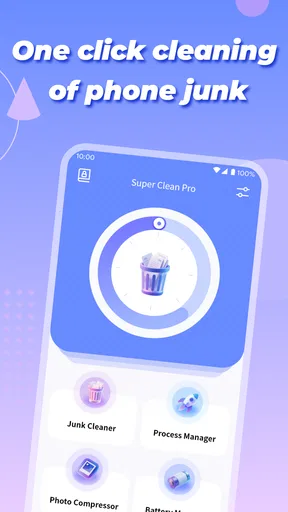
Once you fire it up, you're greeted with a dashboard that's as friendly as your favorite barista. The main screen showcases all the essential tools you need to give your phone a good scrubbing. There’s a big, tempting button labeled "Clean" that practically begs you to press it. And guess what? I did.
Worth Reading Before You Choose

EA SPORTS FC Mobile 26 Is a Bigger Football Game, but It Takes Time

Flipboard Shows What News Apps Must Do Beyond the Feed

Switching to Android Auto Means Rethinking Your Driving Routine

Google Calendar Makes a Crowded Week Easier to Manage

Ludo King Makes the Most of the Minutes Between Plans

Baby Panda World Brings Quick Play to Modern Phones, but Its Game Library Feels Busy
Features That Make a Difference
Let's talk features. Super Clean Pro isn't just about cleaning junk files. It’s got a whole arsenal of tools designed to optimize your phone’s performance.
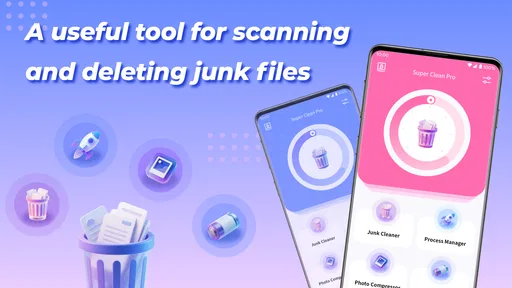
- Junk File Cleaner: This is the app’s bread and butter. With just one tap, it scans and removes all the unnecessary files clogging up your storage. I was surprised at how much space it freed up on my device. Goodbye, old cache files!
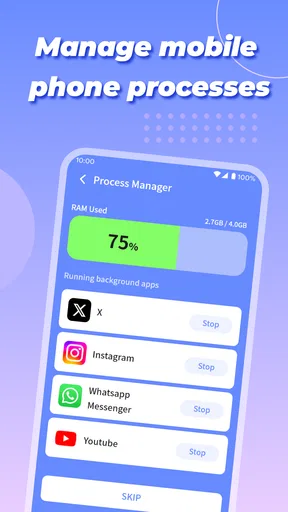
- Phone Booster: Feeling like your phone's trudging through molasses? The booster feature clears up RAM and stops unnecessary background processes. I noticed my apps opening faster and my phone running smoother.
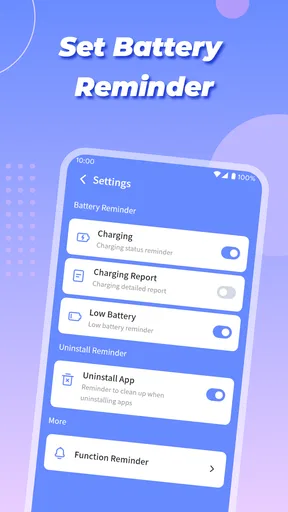
- Battery Saver: We all know the pain of watching our battery percentage drop like it’s a countdown to doom. The battery saver function optimizes your battery usage and extends life by identifying power-draining apps.
- CPU Cooler: If your phone heats up faster than a summer day, the CPU cooler feature helps in cooling it down by closing apps that are causing the heat surge.
A safer cleanup routine
A useful habit with any cleaner is to pause at the point where it asks you to remove something. I would not treat a “clean” result as permission to delete every suggested item without checking what it represents. Temporary app data can be recreated, but it may also include information that makes an app load content more quickly or keeps a session convenient. If you rely on an app for offline access, maps, drafts, or recently viewed material, check inside that app before clearing data or storage through Android settings.
For a realistic example, imagine you are about to record a family event and your phone warns that storage is nearly full. I would use a cleaner as a prompt to inspect the situation, then look at large videos and downloads in the phone’s storage tools before removing anything personal. That workflow is less dramatic than tapping a single button, but it lowers the chance of deleting something you wanted to keep. Backing up photos and videos first is also sensible when they matter; a cleanup tool should not replace a backup routine.
There is another small but important trade-off: a scan can make clutter visible, yet the largest storage gains often come from files you recognize and choose deliberately. Clearing caches may help at the margins, while reviewing old recordings, duplicate downloads, or apps you no longer use can be more consequential. I would use the app to make maintenance approachable, then let my own judgment decide what is safe to remove.
What’s the User Experience Like?
Using Super Clean Pro is as simple as pie. The app guides you through each feature with prompts that even the least tech-savvy person could follow. I loved the lack of intrusive ads, which is a huge plus in my book. It feels like the developers genuinely want you to have a seamless experience.
One thing that stood out to me was the app's ability to keep running in the background without being a nuisance. It's like having a silent guardian angel for your phone’s well-being.
How it fits beside Android’s built-in tools
Compared with the usual alternatives, this app’s appeal is having several maintenance ideas gathered in one place. Android’s own storage settings are often the better choice when I want a direct view of what is taking up space or need to manage a particular app’s data. Those controls are closer to the system and can make the consequences of a change easier to understand. A dedicated cleaner may feel more inviting for a quick check, but I would not assume that its recommendations are automatically more complete or more accurate than the phone’s settings.
I also would not use a booster as a substitute for finding the app that is actually causing trouble. If one social app or game keeps consuming battery, checking its battery use and background activity in Android can be more targeted than closing a broad set of processes. Likewise, if the phone gets hot while charging or during a demanding task, stopping the activity and letting it cool is more sensible than repeatedly running a cooling tool. These are not reasons to avoid a cleaner; they are reasons to use it for the right job.
Before acting on a scan, I’d ask myself three things: am I trying to recover storage, address a specific app problem, or just hoping the phone will feel faster? If it is storage, review the suggested items and check important files. If it is one troublesome app, investigate that app directly. If the goal is general speed, try a restart and remove apps you no longer need before expecting a cleaner to solve a deeper hardware or battery issue. That quick diagnosis helps prevent a tidy dashboard from becoming a substitute for the real fix.
Who is likely to get value from it?
I can see this being a reasonable fit for people who prefer a guided interface to digging through Android menus, especially when they want a convenient place to start a storage tidy-up. It may also suit someone who understands that a “boost” is a short maintenance action, not a permanent upgrade. Newer Android users may appreciate a simpler route into phone housekeeping, as long as they read prompts rather than approving every recommendation automatically.
On the other hand, I would skip it if you already manage storage comfortably with Android’s built-in controls, or if you are looking for a dependable cure for an aging phone’s slowdowns. It is also a poor match for anyone who wants a detailed, item-by-item file manager or needs a guaranteed performance outcome. In those cases, the system settings, a dedicated file-management workflow, or troubleshooting the particular app causing the issue is likely to be more useful.
The app’s minimum OS requirement is Android 6.0, which gives it a broad compatibility starting point for Android devices. Still, compatibility alone does not tell me how a particular phone will behave: available storage, manufacturer software, and the apps installed all shape the result. If your device has an unusual interface or aggressive battery controls, I would pay attention to how its own settings interact with any background utility rather than assume every Android phone handles maintenance identically.
Is It Worth the Download?
So, after spending some quality time with Super Clean Pro, what's the verdict? Well, if you're looking for a way to breathe new life into your phone without the hassle, this app is definitely worth a shot. It’s effective, easy to use, and doesn’t bombard you with ads. Plus, it’s like having a personal assistant who’s obsessed with keeping things tidy.
In a world where our phones are practically an extension of ourselves, having an app like this is a game-changer. If your phone is in dire need of a spring cleaning, give it a go. You might just find that your phone has a lot more pep in its step than you thought.
And there you have it, folks. A cleaner, faster phone is just a tap away. Happy cleaning!
My practical verdict
Because there is no purchase price to pay, I think trying it is reasonable if you want an approachable cleanup interface and are comfortable reviewing what it proposes to remove. The value is convenience, not a guarantee of faster performance or extra battery life. I would use it occasionally when storage feels crowded, then compare the result with Android’s storage screen and keep important files backed up. If it does not solve the particular problem you have, uninstalling it and using the relevant system setting is a perfectly sensible outcome.
Pros
- Efficiently cleans junk files.
- Boosts device performance.
- User-friendly interface.
- Customizable cleaning options.
- Supports multiple languages.
Cons
- Contains ads in free version.
- Limited features without premium.
- Occasional slow scanning.
- Requires frequent updates.
- Some features need permissions.
FAQs for Super Clean Pro
What is Super Clean Pro and what does it do?
Super Clean Pro is an advanced mobile optimization app designed to enhance the performance of your device. It cleans junk files, boosts memory, and manages battery usage efficiently. The app aims to keep your smartphone running smoothly by removing unnecessary files and apps that slow down the system.
Is Super Clean Pro safe to use on my device?
Yes, Super Clean Pro is safe to use. It is designed with user safety in mind, ensuring that no critical system files are deleted during the cleaning process. The app only targets junk files, cache, and unused applications, keeping your personal data and important files secure.
Does Super Clean Pro require any special permissions?
Super Clean Pro requires certain permissions to function effectively, such as access to storage for cleaning junk files and permission to manage apps for optimizing device performance. These permissions are necessary to ensure a comprehensive cleaning and optimization process, but the app does not access any personal data.
How frequently should I use Super Clean Pro for optimal performance?
For best results, it's recommended to use Super Clean Pro at least once a week. Regular use helps maintain optimal device performance by routinely clearing out junk files and managing resources. Users can also set up automated cleaning schedules within the app for convenience.
Is there a cost associated with using Super Clean Pro?
Super Clean Pro offers both a free version with basic features and a premium version with advanced tools. The premium version may include additional functionalities such as enhanced cleaning options, ad removal, and priority customer support. Users can choose based on their needs and budget.


